How to take the corrections you already gave Claude Code and turn them into knowledge, skills and gates that work for you and your team. With copy-ready prompts for every step.
We all know this session. You asked for something simple, Claude went the wrong way, you corrected it, it fixed half, you corrected it again. An hour later it worked, and you walked away tired.
But look at what happened there: with every correction, you explained something to Claude that isn't written down anywhere. How your team works, what must not be touched, in what order the work gets done. That session is a record of the knowledge Claude was missing, and it's already saved on your machine.
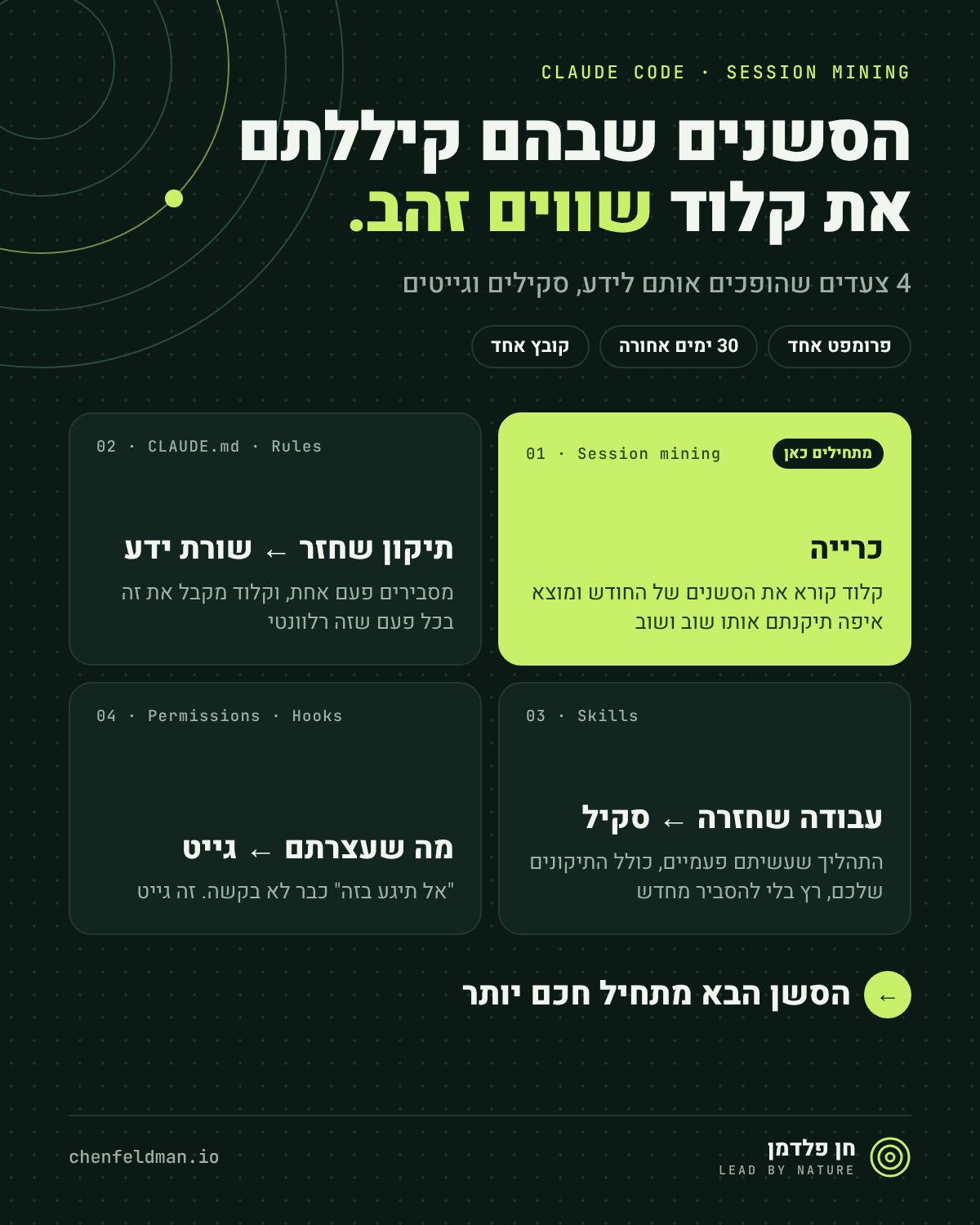
This guide turns it into three things: knowledge lines Claude gets without you explaining again, a skill that runs the work you did twice, and a gate that stops what you used to stop by hand.
What Claude Code already has, and what's missing
Claude Code doesn't ignore your corrections. Before you build anything, it's worth knowing what's already there:
| What | What it does | What it doesn't do |
|---|---|---|
| Auto memory | Claude keeps notes for itself per repo, including corrections you gave, and you can see them in /memory. On by default. | Claude decides what to save. It stays only on your machine, and it's context Claude reads, not a rule that's enforced. |
/insights | An HTML report on recent sessions on your machine: what you worked on, where you got stuck, and suggestions for better use. | Diagnoses across all projects. Doesn't write lines, skills or gates to the repo. |
/team-onboarding | An onboarding guide for a teammate, built from your last 30 days of use. | Helps a teammate get started. Doesn't fix what Claude gets wrong. |
| Session mining | Goes over one repo's sessions and proposes a change for each layer: knowledge, skill and gate. | Changes nothing on its own. You decide what goes in, and it goes into the whole team's repo. |
The important difference is between memory and enforcement. The Claude Code docs say it explicitly:
Claude treats memory and CLAUDE.md as context, not as enforced configuration. To block an action regardless of what Claude decides, use a PreToolUse hook.
From the Claude Code docs, memory page (paraphrased)
Tip: run /insights first to see the big picture, then run the mining on the repo with the most pain. The report tells you where, the mining builds the fix.
Step 0: Where the sessions live
Every Claude Code session is saved as a .jsonl file under ~/.claude/projects/, in a folder per project. Three things worth knowing:
- 30 days. That's the default. After that, the files are deleted when Claude Code starts. Want more? In
~/.claude/settings.json:"cleanupPeriodDays": 90. In an organization, managed settings can set their own value. - Local. The sessions are only on your machine. Sessions from another machine or from claude.ai aren't there.
- Sensitive. The files contain everything you pasted, including logs and keys if there were any. Share what the mining produces, not the files themselves.
Step 1: Mining: one prompt, one file
Open Claude Code inside the repo and paste. The prompt reads, summarizes and writes one file. It doesn't touch anything else.
The mining prompt
Read my Claude Code sessions for this repo from the last 30 days: the .jsonl files under ~/.claude/projects/ for this project. Focus on sessions where I corrected you, pushed back, or we went back and forth before it worked.

Find:
1. Knowledge: corrections or explanations I gave more than once. Write each as one line that can be checked, and say where it belongs: CLAUDE.md, or a rule scoped to a folder.
2. Skill: one multi-step job I asked for more than once. Give it a name, say when to use it, list the steps as we actually did them (with my corrections), and name the session it came from.
3. Gate: one thing you did that I had to stop or undo. Propose a permission rule or a hook that would block it next time.

Write it all to mined.md and don't commit it. Don't change any other file.
Here's what a result looks like, in a shortened example:
mined.md, shortened
## Knowledge
- Core functions never return null or undefined for "not found".
  They return a Result. - seen in 3 sessions - a rule for src/core/
- Run tests with "npm test -- --run". Never start watch mode.
  - seen in 2 sessions - CLAUDE.md

## Skill
- Name: bug-triage
- When: a new bug report needs a first investigation
- From: the session that starts "users say checkout fails when..."
- Steps: 1. reproduce it with a failing test  2. find the change
  that caused it  3. write the note as Cause / Evidence / Fix

## Gate
- You edited an existing test to make it pass. I undid it twice.
  Proposal: a PreToolUse hook that blocks edits to tests already in git.
How to read it: every line is a proposal. What looks right moves on to the next step, what doesn't gets deleted. "seen in 3 sessions" is the best signal: a correction that came back three times has already cost you too much.
Step 2: A repeated correction becomes a knowledge line
The only question here is where the line lives. Each place loads at a different time:
| The line is | Where it lives | When Claude gets it |
|---|---|---|
| True for the whole repo | CLAUDE.md | At the start of every session. After a commit, the whole team gets it. |
| True for part of the code | .claude/rules/<name>.md with paths: | Only when Claude works on a file that matches the path. |
| A personal preference of yours | ~/.claude/CLAUDE.md, or "remember that..." for auto memory | In every session of yours, in every repo. Doesn't reach the team. |
| Must always happen | Not here. That's a gate, step 4 | Enforced regardless of what Claude remembers. |
Here's an example of such a rule. It loads only when Claude touches code under src/core/, so it doesn't take up room in the context when you work on something else:
.claude/rules/results.md
---
paths:
  - 'src/core/**'
---

# Results, not null, in the core

- A core function never returns null or undefined to mean "not found" or "failed". It returns a Result from src/core/result.ts: { ok: true, value } or { ok: false, reason }. Create the file if it's missing.
- reason is a short code a caller can switch on ('not-found', 'invalid-input'), never free text.
- Callers handle ok: false explicitly: no `!` assertions, and no `?? default` that hides a failure.
- Why: a silent null travels far before it breaks. A Result makes the caller decide at the call site.
Three rules for a good line
- Add it the second time. One mistake is a coincidence. A mistake that came back is a line.
- Write it so it can be checked. "Clean code" can't be checked. "Don't return null from src/core" can.
- Add the why. One line of reasoning helps Claude decide right even in a case you didn't write down.
Check that it worked: the safest check is in a new session. Exit, come back in, give Claude a task in the folder, and at the end ask: "which rule files did you follow for this?". And make sure CLAUDE.md stays under 200 lines. Whatever is relevant only to part of the code moves to a rule.
Step 3: Repeated work becomes a skill
A skill built from a real session already includes the corrections you gave. A skill written from imagination hasn't met them yet. So you don't write it from scratch, you go back to the session itself.
- Find the session:
claude --resume, and search by the first prompt that mined.md named. - Paste the capture prompt inside that session. Claude sees the whole conversation, including every correction.
- Read the files before you approve.
The capture prompt, inside the old session
Turn what we did in this session into a skill at .claude/skills/[name]/ and one sub-agent:
- SKILL.md: frontmatter with name and a description that says what it does and when to use it, so you'd pick it on your own. Then the steps exactly as we did them, including every correction I gave you. Keep it short.
- scripts/ for any step that must run the same way every time (a command, a query, a format), and SKILL.md says when to run it. references/ only for anything long.
- .claude/agents/[job].md for the part of the job that reads a lot or could run on its own: name, description, read-only tools if it only reads, and model: haiku if the job is mechanical. SKILL.md tells Claude to use it.
Show me the files before writing.
What each frontmatter line does
| Field | What it does |
|---|---|
description | What the skill does and when. Claude uses this to decide to pick it on its own. If the skill doesn't trigger, this is the first thing to fix. |
disable-model-invocation: true | Claude won't trigger it on its own. Only you, with /name. Good for a skill that does something you want to decide on. |
allowed-tools | Pre-approves tools, without asking, while the skill runs. For example, the skill's own script. It doesn't restrict: other tools keep following the normal permissions. To restrict, use deny. |
model: haiku | In the agent's file: mechanical work runs on a cheaper, faster model. |
Check that it worked: /exit, a new session, and ask for the work in your own words on a new case. Did it trigger on its own? Did the agent run? Did the work come out right? If it didn't trigger, improve the description.
Step 4: What you stopped becomes a gate
This is where "don't do that" stops being a request. A gate is enforced by Claude Code itself, not by the model, so it works in auto mode too. There are two kinds:
| What | When to use it | Example |
|---|---|---|
| Permission | The rule is a tool or a path: secrets, folders that must not be edited, dangerous commands | "deny": ["Read(./.env)"], and "ask": ["Bash(git push *)"] |
| Hook | Anything you can check in a script | A PreToolUse hook that blocks editing a test that already exists in git |
The order in permissions: deny first, then ask, then allow, and the first match wins. And what's blocked by deny in one settings file, no other file can allow. A PreToolUse hook runs before the action, and exit 2 stops it and sends the reason back to Claude. No restart needed: Claude Code usually picks up changes to hooks on its own.
Building the hook
Add a PreToolUse hook to this repo that blocks [the thing I keep stopping you from doing, e.g. edits to test files that already exist in git]. Put the script in .claude/hooks/[name].sh: it reads the tool call JSON on stdin and exits 2 with a clear reason on stderr when it should block. Wire it in .claude/settings.json for the right tools, keep everything else in that file as it is, and show me both files with a one-line explanation of each part.Then you check that the gates really stop things, and that what should go through goes through:
Testing the gates
Test the gates, one at a time, and keep going after a block. Don't work around any block, just report it: 1. [something the deny rule should stop]; 2. [something the hook should stop]; 3. [something that should go through]. End with a table: what you tried, what happened, what stopped you (deny rule, hook, nothing).Permission or hook? A tool or a path: permission. Everything else you can check in a script: hook. And remember that "allow" from a hook doesn't override deny.
The rhythm: once a month
Sessions are deleted after 30 days, so this is a mine with an expiry date. Once a month, run the mining, and add what passed the three tests: it came back more than once, it can be checked, and it has a clear place.
After a few months, something changes: the hard sessions get shorter, because Claude starts from where the last session ended.
Start today: copy the mining prompt, and run it on the repo that annoyed you most this month.