The Experiment I Decided to Run — and Why Now
In 2020, at Gong, I watched up close as a Research team of NLP PhDs created a real competitive edge for the product. Back then it took longer to yield results, but the advantage just kept growing.
In 2023, my team worked in an unconventional collaboration with that same Research group. Instead of waiting for a model to be ready and then building on top of it, we worked together in short cycles — an approach that wasn't common at the time. We shipped behind a Feature Flag, learned to speak the language of precision (what does 0.71 mean? is 0.82 good enough for users?), and in parallel taught the Research folks to speak product language.
These leaps happened at companies that understood early on — with the arrival of powerful models like GPT-3 — that AI and Engineering had to be integrated and seamless, not something handed over separately.
Today, a few years on, that's obvious. And not just for companies where AI is their bread and butter, but for anyone who wants to build a product.
But this revolution creates a complicated situation. Companies with large R&D teams and established products find themselves wrestling with hard questions: Should we reduce headcount? Fewer management layers? Should we decide that everything — specs, design, development — happens with AI first? Which tools to use? How much trust to give AI in Code Review?
Meanwhile, builders starting today are moving faster. Their cost of mistakes is lower. They haven't hired a huge team, haven't built a product that needs maintaining, and don't have masses of users whose uptime they're responsible for.
So I decided to run an experiment.
As someone who has been both a developer and an engineering manager at companies throughout every stage of this revolution, I saw what was happening from the inside — the pain points and the advantages. Now I wanted to put on the hat of a builder starting a simulated company with an AI-First approach.
The Product: BridgeBoard
I set up a simulated company with a real product that solves a problem I've seen over and over in companies. BridgeBoard connects the Sales team to the Engineering team in one shared view. The salesperson enters deals with the features a customer needs, engineering enters their Roadmap, and the system automatically identifies how much revenue is at risk because of gaps between what was sold and what was built. The founder gets a dashboard showing exactly where money is being left on the table.
I chose a product simple enough to build as an MVP but realistic enough — with multiple personas, business logic, and scenarios that happen in real companies every day.
The goal: to take stages from the SDLC — from Ideation and PRD through architecture, development, tests, and production deployment — and demonstrate AI-First approaches. Try to measure things. Be honest about what works and what doesn't.
This post focuses on the phase before a single line of code was written — the planning. And I think this part is actually the most interesting.
Why Plan Instead of Just Vibe Coding?
I've seen a lot of people share stories about shipping a product in 24 hours with Vibe Coding, then getting tangled up a week later and needing technical people to help them out. It looks cool and you get something to show — but fixing it afterward is a nightmare.
Planning that takes an hour or two can save enormous pain down the road. And this might be one of the most important insights from this experiment: planning with AI doesn't take a lot of time — and especially not a lot of time compared to the old way. It doesn't feel bureaucratic; it feels like a conversation with a smart colleague.
So before I started building, I sat down with Claude and planned. Let's dive in.
Stage 0: Planning the Experiment Itself — Before Starting at All
Before I started building a PRD or touching architecture, I sat with Claude and planned the experiment itself at a high level. What are the stages? What's the order of work? What scripts and prompts will I need at each stage?
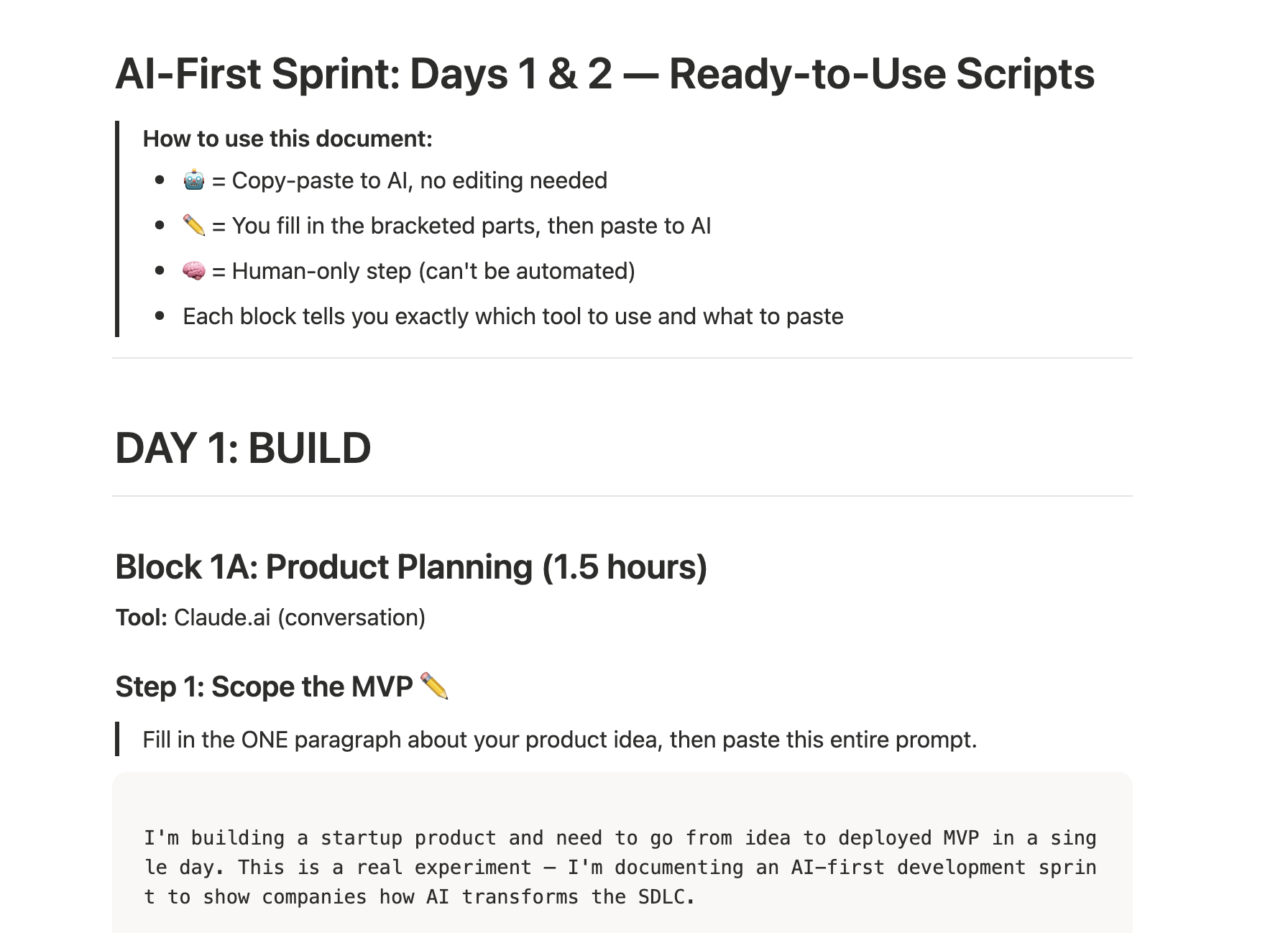
The interesting part: I also asked Claude to guide me on where, in its view, it would be important for me as a Human to step in, pause, check, and decide before continuing. In other words — I planned the Human In The Loop checkpoints in advance. I didn't wait for something to go wrong to discover I should have been watching. I defined upfront: "here you stop and check, here you approve, here you challenge."
The output: a work plan with defined stages, prompts ready for each stage (which I could modify later if needed), and pre-planned discussion and review points. It took maybe half an hour — and gave me a clear framework to run with.
Stage 1: Building the PRD — Product Specs with AI
I started a conversation with Claude about BridgeBoard. I didn't give it a one-shot prompt of "build me a PRD" — I held a conversation, added context, navigated.
The result: a detailed spec in product language, broken down by persona, with Flows for each one. Every piece of Context I added — user feedback, Jira bugs, business considerations — contributed to the spec and made it more precise.
What Worked Excellently
The bridge between product and engineering. In the generated spec, the product manager gets technical language closer to what developers use — a proposed API structure, data structures, relationships between entities. Clearly the developer is still ultimately responsible, but the ability to produce something in zero time that better explains the intent — that reduces friction. And from the other direction, developers who speak business language can suddenly produce product conversations before they start developing.
Update speed. The moment a decision changes or new information arrives — updating the spec is very easy. Different slice breakdown? Different Flow? A question about what goes in the MVP? Claude helped consult, explain, and refine. And this is still without adding organizational context that would certainly contribute even more.
Self-criticism. I asked Claude to critique its own spec, raise hard questions, and challenge the decisions. It works. Questions come up that I personally don't always think of — like a colleague asking to challenge you, only sometimes several times more effective.
What Does It Look Like in Practice?
Here's a real example from the generated PRD. Note the level of detail — User Stories with clear Acceptance Criteria, broken down by persona:
Story 3: Founder Dashboard
As a founder, I want to see total pipeline revenue, revenue at risk, and the specific feature gaps causing that risk, so I can make informed prioritization decisions.
Acceptance Criteria:
- Metric Cards Row (top of page): Total Pipeline: sum of all deal revenue. At-Risk Revenue: sum of revenue for deals where at least one required tag has no matching roadmap item. Coverage: percentage of deals that are fully covered.
- Gap Table: Feature name, Deals Needing It (count), Revenue at Stake. Only shows tags that have NO matching roadmap item. Sorted by Revenue at Stake descending.
And beyond that — the PRD also included a breakdown into Release Slices with clear timelines and Ship Gates. The principle: release business value early, add infrastructure later.
Slice 1 - Mocked Dashboard (1.5h): All three pages with mock data. Zero database, zero API. Just static React that can be shared with Design Partners to test whether the idea works — before investing another 5 hours building it.
Slice 2 - Sales Pipeline Live (2h): The backend goes up, Sales can enter deals, the dashboard updates with real data.
Slice 3 - Full Loop (1.5h): Engineering also enters Roadmap Items. The full loop works: enter a deal → see risk → enter a feature in Roadmap → the risk disappears.
Key insight: After an hour and a half you already have something to show. After three and a half hours you have a product people can use.
The full PRD also included a Data Model, detailed API definitions, a clear Out of Scope section, and Success Criteria. All created in a single conversation, with mutual challenges.
What Worked Less Well
A spec so large it's hard to digest. Claude produced an overly detailed spec. In hindsight, it's better to start in pieces, approve each one, and connect them gradually — a bit like code. That way you both feel the spec is truly yours and ensure the ideas and details are right.
The Review stage is still critical. We're still not at 100% trust that the generated spec is what we would have produced ourselves. You need to read, ask, challenge — and maybe that even takes longer than a regular review, because there's so much more content.
Important note: In this experiment I skipped stages that absolutely exist and belong in a real process — user interviews, data analysis from Pendo or MixPanel, working with a designer on Wireframes in Miro, using Figma Make. The goal right now is to focus on the engineering part. In future experiments I'll also go deeper on those parts.
Stage 2: Architecture — When the Big Picture Gets Built Fast (Maybe Too Fast)
After the spec was ready, I asked Claude to produce an architecture. If I thought the spec was large — the architecture was several times bigger. Split into team member role definitions, each with extensive detail on what they do, technology alternatives, diagrams.
What Worked Excellently
Understanding alternatives in zero time. The ability to arrive at and understand technology alternatives much faster, ask questions and get explanations — that changes the game. Even a product manager can ask technical questions and come to a team conversation much better prepared.
Immediate POC for alternatives. When it's hard to choose between alternatives, you can take a team of Agents and ask them to build a mini-version of each and compare. We used to dedicate days to a week+ for this. Here in less than a day you can make a better architectural decision.
Automatic diagrams. No need to draw from scratch. Everything is drawn, in an understandable format, and I can generate versions for more or less technical audiences.
Again — the bridge. The product and developer personas get closer. Each feels more comfortable with the output from the other side.
What Does It Look Like in Practice?
The architecture document wasn't just a list of technologies. Each technology choice had a clear explanation of why it was chosen — and why the alternatives were not:
Backend Framework: Fastify (over Express, Hono, NestJS)
Why Fastify over Express: Fastify gives us schema-based validation out of the box. For a 1-day build with parallel agents, this matters - the backend agent can define request/response schemas that double as both runtime validation AND documentation.
Why not NestJS: Massive overhead for a 5-endpoint API. NestJS's decorators, modules, providers, and DI container would triple the file count and confuse AI agents with boilerplate.
ORM: Drizzle ORM (over Prisma, Knex, raw pg)
Why Drizzle over Prisma: Drizzle schemas are TypeScript files - no separate
.prismaschema language, no code generation step. The backend agent writes aschema.tsfile and immediately has full type inference. Prisma requiresnpx prisma generateafter every schema change, which breaks AI agent flow.
Notice: the technology decisions were chosen not just based on what's "best" in general, but based on what fits rapid building with AI Agents — a consideration that normally doesn't appear in classical architecture. This is a new lens worth starting to think through.
Additionally, the architecture document included a detailed Component Tree, a full DB Schema with explanations, and a clear breakdown of who works on what — already in preparation for the Agent Teams stage.
What Worked Less Well
Same problem — too large. Here too it's better to go step by step, verify you understand each decision, are comfortable with it, and know its value. Gradual work and approving each step before seeing the connection.
Danger for less experienced builders. If I'm not an experienced developer and Claude gives me alternatives that aren't necessarily correct — I might make a dangerous choice. Experience and understanding of architectural decisions matter here and at least help you understand what price is being paid. There are no shortcuts to understanding.
Stage 3: Work Breakdown — Work Tracks
Here I took the spec and architecture and asked Claude to produce a clear description and work order. The goal: to later be able to direct a team of Agents (or any other solution) when everything is clear — who depends on whom, who works in parallel, who's responsible for what, and where there's shared context.
Why This Is Especially Important
In small startups, producing an organized work order with dependencies and risks is usually too bureaucratic. You want to run fast. But when the cost of producing it is nearly zero — there's no reason not to do it. And it's worth investing in.
What Does It Look Like in Practice?
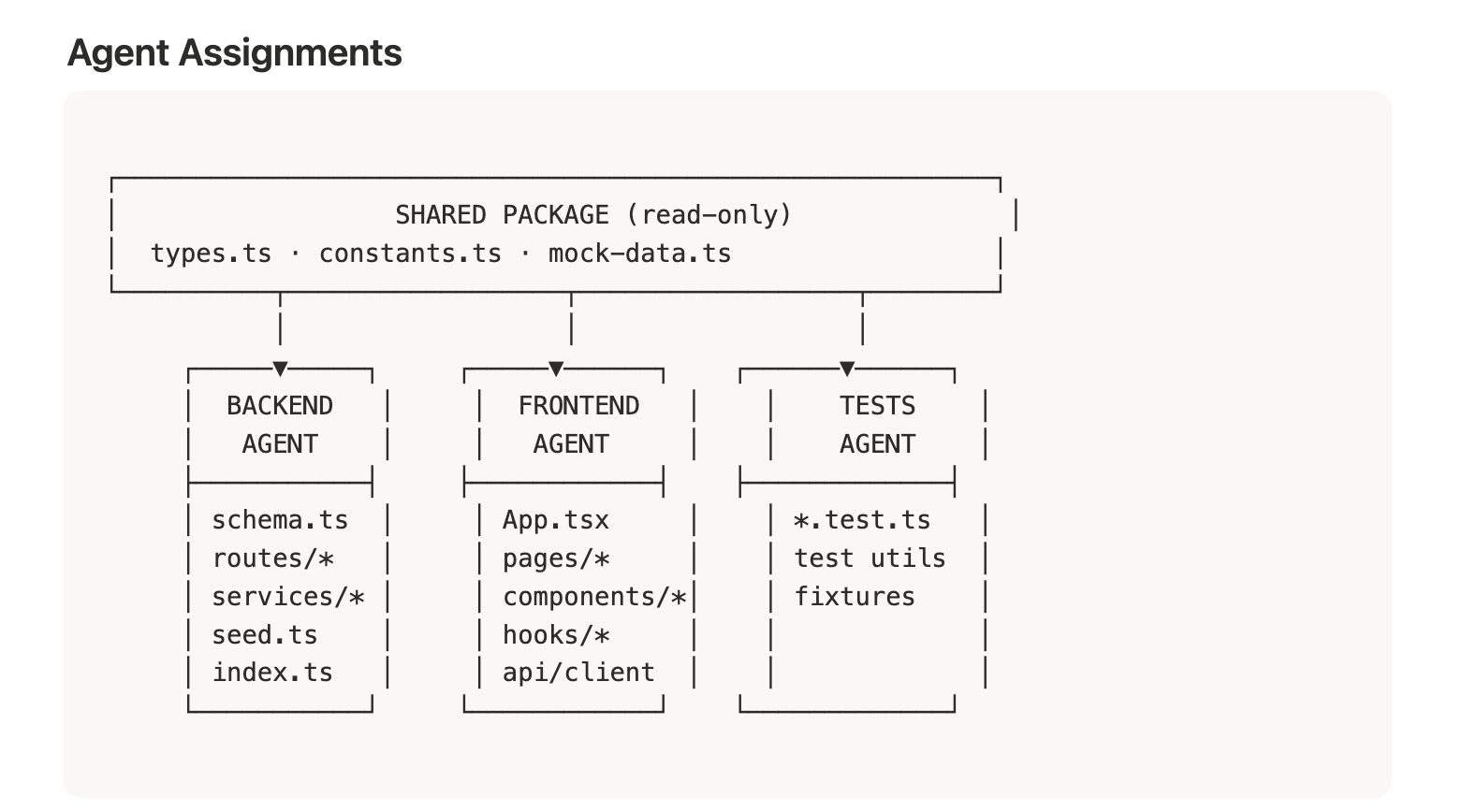
The Work Tracks document divided the work into three parallel Tracks — Backend, Frontend, and Tests — with a clear definition of what each Agent does, in what order, and what the shared Context is between them. Here's an example of the structure:
Backend Agent          Frontend Agent         Tests Agent
──────────────         ──────────────         ───────────
B1: Setup              F1: Setup              T1: Setup
B2: DB Schema          F2: Mock client        T2: Tag parser tests
B3: Tag parser         F3: Shared components  T3: Risk engine tests
B4: Risk engine        F4: Nav + router       T4-T7: API tests
B5-B10: API routes     F5: Dashboard page     T8: Component tests
B11: Seed script       F6: Sales page
B12: Static serving    F7: Engineering page
The critical point: the Frontend Agent ships Slice 1 (complete UI with Mock Data) before the Backend is even ready. Zero dependency. They meet only at Slice 2. This is a way of thinking that needs to be planned in advance — and it saves a lot of time.
Additionally, each Agent had a Shared Context Document attached at the start of their work with clear instructions: don't touch files that aren't yours, follow the shared types, document what you did. Like a real team sitting in one room — except each one knows exactly what to do without waiting for anyone.
What Worked
Low-cost alignment. The ability to ensure alignment between the spec, architecture, and work order — without a bureaucratic feeling. It just works.
Markdown files as Context. I saved everything as Markdown files — spec, architecture, work order — which are incredibly easy to attach as Context to the project. Each additional document improves the next step of work and its accuracy. It's easy to discover gaps between spec and architecture that sometimes only emerge mid-work, or worse — when the product reaches users.
Fast decisions on changes. When I saw there was too large a dependency or a part that would take too long — I could decide on a different work order. For example: I decided to drop PostgreSQL and work with LocalStorage in the simplest way possible, just to test the product. The upgrade could come later.
Full transparency on decisions. I felt confident in keeping the PRD, architecture, and work document separate and being able to change them at any time. This isn't Vibe Coding of "build me such-and-such a system." I can get down to the detail of every decision, what it's based on, and change that basis without everything falling apart.
What Worked Less Well
Honestly? Here I felt the stage worked really well. It organized things, didn't take much time, and right now I have nothing negative to say.
Bottom Lines
1. AI-First Planning Doesn't Feel Like Bureaucracy — It Feels Like a Conversation
From PRD to a detailed work order with dependencies — this entire stage took a few hours. Not days, not weeks. And what came out is detailed enough that a team of Agents (or people) can run with it.
2. The Lines Between Roles Are Erasing — and That's a Good Thing
Product managers arrive at technical language, developers speak product language, architecture is understood by everyone. The Fullstack Product Engineer people talk about? With AI that's no longer just a dream — it's starting to happen. And wow, how much further this is going to connect with even more roles in the future — that genuinely excites me.
3. The Investment in Planning Pays Off Multiplied
An hour or two of planning saved me from messes that usually only surface in later stages. And with AI, the planning itself becomes an asset — Markdown files that serve as Context for all the work that follows.
4. AI Is Excellent at Self-Challenging — If You Ask
Asking Claude to ask hard questions and challenge itself — was one of the most effective things. Questions come up that I didn't think of, exactly like a good colleague challenging you.
5. "Fast" Doesn't Mean "Error-Free"
Almost all the outputs require human review. A spec so detailed it's hard to digest, architecture with alternatives that aren't necessarily correct, decisions that require experience — the Human In The Loop must be there. The question is exactly when to stop and check, and not be lazy about it.
What's Next?
In the next post I'll share what happened after the lines of code started being written — building an Agent team with Claude Code, how each one got a clear role and tasks, what happened when they ran on their own, the errors, the fixes, and the moment the project went live. Including the Deploy to Vercel experience, a team of specialist Reviewers (Security, Performance, Test Coverage, Code Quality) — and how all of it feels when you're barely on day one of the experiment.
Small spoiler: once the product is live, there will be real scenarios too — a salesperson showing up with a company ready to pay $2M ARR if we ship a certain feature, production Incidents, Support tickets, product requests. Exactly like a real company.
Things I Would Have Done Differently (Quick Retro)
A few things I didn't do as a conscious decision in this quick experiment, and in hindsight would have contributed:
Claude.md — I didn't prepare it in advance. It probably would have saved time and produced more accurate work.
Skills and Hooks — I didn't bother creating or using existing ones. A small upfront investment that probably pays off.
MCP Tools — I didn't treat this as a requirement. Worth thinking about in advance during planning.
Token optimization — I didn't plan for it. This should be part of planning a project with Claude Code, especially with Agent Teams that use a lot of tokens.
Choosing a deploy platform upfront — I didn't decide on Vercel from the start, and that caused wasted tokens and time during Deploy.
GitHub Spec Kit — I came across this Toolkit for Spec-Driven Development that formalizes a flow similar to what I did here. Interesting that I arrived at a similar approach organically. In one of the next rounds I'll try it and compare results.
All of these — excellent material for the next round of the experiment. And that's exactly the advantage of a builder starting fresh: you can "throw away" several days of work and start again. In a big company that's simply not done.
Want to implement an AI-First approach in your organization or team? I'd love a quick call — fill in your details and I'll get back to you.
Schedule a CallThis post is part of the AI-First Company experiment series I'm running and documenting in real time. Follow me here and at chenfeldman.io for the full details.