What Happened That Made Me Stop
After two days of building the product with Claude Code, I sat down to do a retro with myself. I saw things in the field I didn't like.
Agents on the team got stuck. Some tried the same thing three or four times, failed, and kept trying — across different sessions. I discovered this in hindsight. A waste of time and tokens that could have been prevented.
I deployed, waited, and only discovered issues after things were already live. Each time either I or Claude Code caught the problem and fixed it — but it could have been avoided with better automated processes.
There were implementation choices Claude made that I wasn't happy with, or I'd need to go through several conversations before reaching the right solution. Working with Skills — files that describe "this is how I want you to work" — can give Claude direction from the start instead of reinventing the wheel every time.
And a few other things. But those alone were enough to make me stop and think about what to do next.
The Decision: A Refactor Day for the Work Infrastructure
Intuitively, it didn't feel like the right time to rush forward to the next feature. Yes, I had ideas ready — I'd already jotted down notes on a Sub-agents experiment and also on creating an automated Code Review with the Anthropic API that would go through PRs. But something didn't feel right.
It's like building a new company. Sometimes, when you're trying to generate strong velocity over the medium-to-long term, you need to stop so things can move faster later. And not to accumulate too much technical debt — because in the end you pay for it dearly.
So beyond my own knowledge that things like Claude.md, Skills, Hooks, and Memory would contribute to future work, I did something else: I ran the /insights command in Claude Code. This command generates an insights report on Claude Code usage — what worked well, what didn't work well enough, and concrete suggestions for improvement.
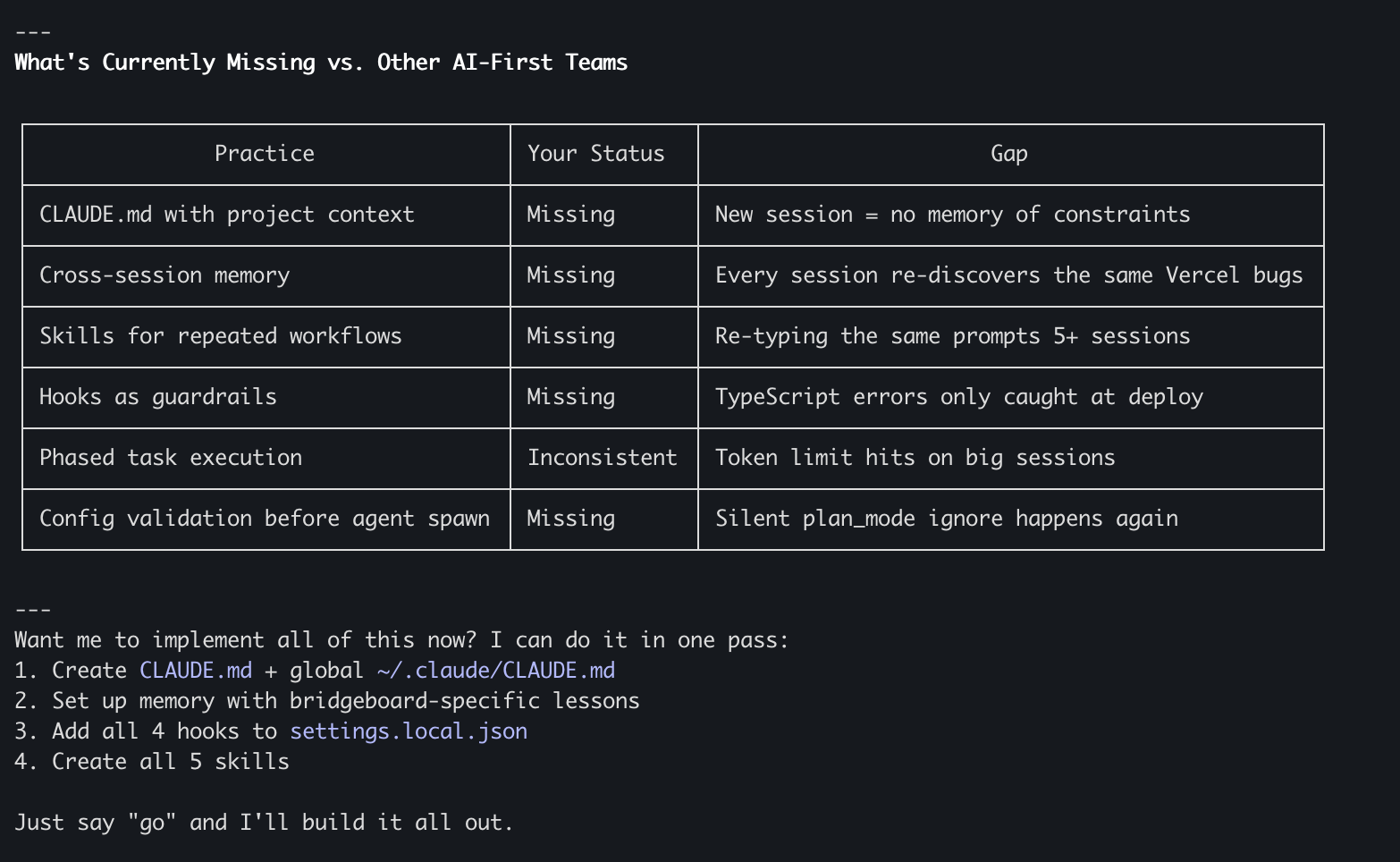
The report suggested very practical upgrades to Claude.md and a few Custom Skills that it believed would help Agents work much more efficiently, get stuck less, and save time and tokens.
I combined the conclusions from Claude Code's report with my own retro based on my experience — and created an additional day for the experiment. A Refactor day aimed at building strong foundations that would benefit everything that came after.
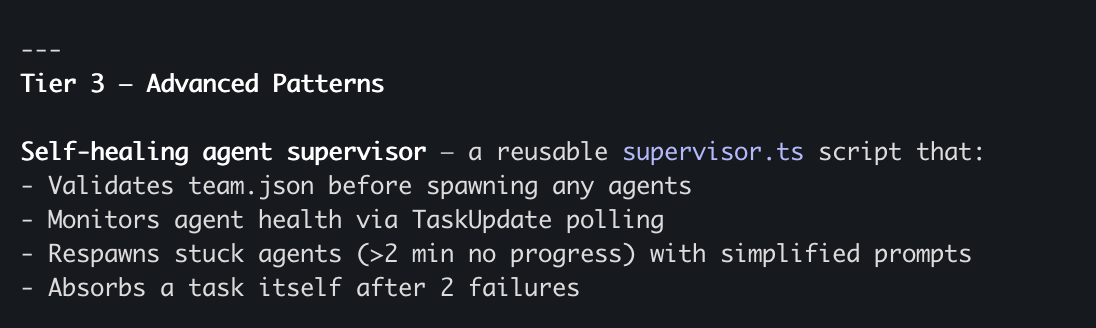
What We Built — and Why Each Part Exists
This day wasn't about writing product code. It was about building the infrastructure that makes every future session with Claude Code faster, cheaper, and more precise. Exactly like onboarding a new developer — writing the team's Playbook, installing the right tools, and setting standards. Except that here, the "new developer" wakes up every morning with no memory.
Let's dive into each part.
Claude.md — The Rulebook That's Always Open
What it is: A Markdown file that Claude reads automatically at the start of every session. You don't need to type it as a prompt — it's always there as background context.
Two levels:
At the project level (/your-project/CLAUDE.md) — project-specific rules: the tech stack, API contracts, deploy constraints, agent organization rules, code standards.
At the global level (~/.claude/CLAUDE.md) — preferences that span projects: my working style, communication preferences, quality gates, things Claude should never do.
Why it matters: When working with Claude Code session after session, without Claude.md every session starts from scratch. You need to re-explain the same constraints, the same stack, the same style. That's a waste of tokens in every session — the exact amount depends on project size and complexity, but multiply that explanation across dozens and hundreds of sessions and it adds up fast. And beyond tokens, it's also a waste of your mental energy. Now Claude starts every session already knowing the project, its constraints, and the way I like to work.
When to use it: If you've found yourself explaining the same thing three times — it belongs in Claude.md. "Use in-memory storage, not PostgreSQL" — that goes in there. "Never use TypeScript project references in Serverless" — same.
Memory — The Memory That Persists Between Sessions
What it is: A MEMORY.md file stored locally on your machine (inside ~/.claude/projects/) that holds knowledge learned from experience — things discovered during work that should influence future sessions. Important: Memory is local and doesn't go into the repo — it's your personal memory from your sessions.
What goes in there: Lessons from deploys ("NodeNext module resolution breaks Vercel's bundler — use CommonJS"), Agent patterns that worked versus ones that failed, known gotchas and their solutions, and a kind of Living Retro — a running log of successes and failures that gets updated after significant sessions.
What's the difference between Claude.md and Memory?
Claude.md contains stable rules and conventions. It changes rarely. You write it upfront. It loads every time.
Memory contains learned lessons and field insights. It changes after every significant session. You and Claude write it together, during the work. It also loads every time.
In short: Claude.md is the Playbook. Memory is the Retro Log.
When to start: The moment you solve a problem that cost you more than 30 minutes — document it. Your future self will thank you.
Why it matters: You don't debug the same problem twice. You don't re-paste Error Logs from previous sessions. And the longer time goes on — the value only increases, because every session adds knowledge.
Hooks — Automated Guardrails
What it is: Shell commands that Claude Code runs automatically on Lifecycle Events — before or after certain actions. They run without needing to ask.
Important — local or shared? Hooks are defined in Settings files, and there's a critical separation here:
- Shared file (
.claude/settings.json) — goes into source control. Every developer working on the repo gets the same Hooks. Suitable for things the whole team needs — like TypeScript checks before a push. - Personal file (
.claude/settings.local.json) — local only, Claude Code configures git to ignore it automatically. Suitable for personal preferences or your own experiments.
I chose to put most Hooks in settings.json (the shared one) because they're relevant to everyone working on the project.
What we set up:
After every TypeScript file write/edit — runs tsc --noEmit automatically. Catches type errors immediately, not at deploy time.
Before every git push — runs TypeScript Check + full test suite. Nothing broken gets through.
Before every vercel deploy — runs npm run build. Fails locally, not on Vercel's servers.
What's the difference between Hooks and rules in Claude.md?
Hooks are automated enforcement — they run as code every time their event occurs. They're suited for Guardrails and Quality Gates.
Claude.md rules are guidelines — Claude follows them as direction, but can sometimes miss them. They're suited for context, conventions, and constraints.
Rule of thumb: If you can express the check as a Shell command — it should be a Hook. If it's more directional — it belongs in Claude.md.
Why it matters: TypeScript errors caught in seconds instead of being discovered 10 minutes into a deploy. Unnecessary deploy loops — the most common cause of wasted sessions — are prevented before they start. And with zero cognitive overhead — you never need to remember to run the checks. They run themselves.
Custom Skills — Workflows You Can Repeat
What it is: .claude/skills/<name>/SKILL.md files that define repeatable Workflows. You can invoke them with /skill-name or Claude activates them on its own when relevant.
What we created:
Deploy Skill — /deploy — a complete deploy checklist for Vercel: TypeScript Check → Build → Error Classification → Deploy → Health Check. All known constraints baked in.
Agents Skill — /agents — managing an Agent team: reading team.json, listing all configuration fields, confirming compatibility, running Agents with monitoring and intervention protocols.
Review Skill — /review — a Code Review Pipeline with 4 Agents: Read → Analyze → Fix Critical Issues → Run Tests → Report.
Phase Skill — /phase — staged execution for complex tasks: Scaffold → Implement → Test → Deploy, with Checkpoints between each step.
When to create a Skill: When you've run the same Workflow three times and found yourself typing the same Prompt Structure. If there's a pattern — encode it once.
Why it matters: A Workflow that takes 5 minutes of Prompt Crafting becomes a single command. Token savings because the Skill description is compact and content is only loaded when needed. And most importantly — the best version of your Workflow is encoded once and replicated perfectly every time.
Community Skills — Ready-Made Best Practices
What it is: skills.sh is an open Skills library from Vercel, with a Directory and Leaderboard of Skills built by the community — including companies like Vercel itself and independent developers. Install with npx skills add owner/repo --skill skill-name. Worth noting: skills.sh is a tool that installs Skills from GitHub repos, not a closed Marketplace.
How it works: Skills are installed into .claude/skills/ (at the project level) or ~/.claude/skills/ (globally) and Claude Code recognizes them automatically. Once installed, they're identical to Custom Skills — someone else just wrote them. Claude reads the descriptions of all Skills and decides when to activate them automatically. Skills installed at the project level can go into source control and be shared with the team.
What I installed (15 Skills):
Vercel Labs — React/Next.js Best Practices from Vercel's engineering team, and component architecture patterns.
obra/superpowers — Parallel Agent management, verification before completion (directly solving the "Claude said it works but it doesn't" problem), systematic Debugging, writing plans before code, and plan execution with Checkpoints.
wshobson/agents — Next.js App Router patterns, Tailwind Design System, API design principles, parallel Code Reviews, parallel feature development with conflict prevention, task coordination strategies, inter-Agent communication protocols, and team composition patterns.
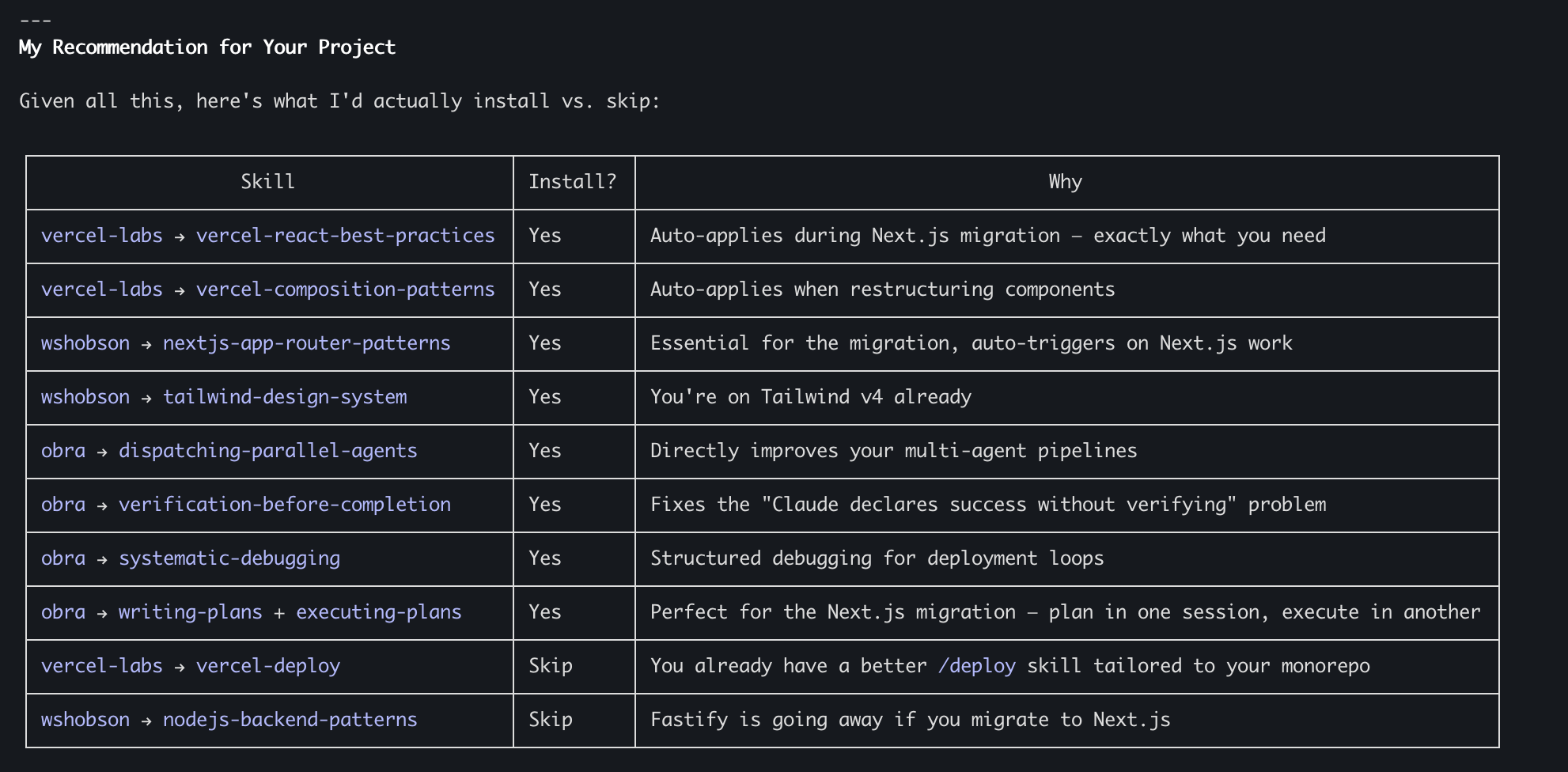
When to use skills.sh vs. Custom Skills: Use skills.sh for universal Best Practices — React Patterns, Debugging methodology, TypeScript. Write Custom Skills for project-specific Workflows — your Deploy Pipeline, your Agent team structure, your Review process.
⚠️ Important security note: Just like with any open source library (think npm packages), don't install Skills blindly. Review the code, use external tools for security scanning, and don't trust anything without examining it. Tools to help do this more automatically are coming soon. Exactly the same principle you already know from working with npm packages — only here the risk is in the Context that reaches your Agent.
The Full Picture — What Exists Now
Shared through the repo (every team developer gets):
| File | Role |
|---|---|
| ~/dev/bridgeboard/CLAUDE.md | Project rules, always loaded |
| .claude/settings.json | Shared Hooks (TypeScript, Tests, Build) |
| .claude/skills/deploy/ | Deploy Skill |
| .claude/skills/agents/ | Agents Skill |
| .claude/skills/review/ | Review Skill |
| .claude/skills/phase/ | Phase Skill |
Personal / local only (only on my machine):
| File | Role |
|---|---|
| ~/.claude/CLAUDE.md | Personal global preferences |
| .claude/settings.local.json | Personal settings (git ignores automatically) |
| ~/.claude/projects/.../MEMORY.md | Memory between sessions |
Community Skills (installed in the project, optionally committed to the repo):
15 Skills from Vercel, obra, wshobson
Pay attention to this separation — it's critical. The project-level Claude.md, the Hooks in settings.json (without .local), and the Custom Skills — they all go into source control. Every developer who does a git pull gets them automatically. The global Claude.md, settings.local.json, and Memory stay only with you — your personal preferences, your experiments, and your session memory.
This enables something important: shared standards and quality checks for the whole team, alongside personal flexibility for each developer.
None of this is dramatic on its own. Together, it changes how every future session works:
Claude starts every session already knowing the project, the constraints, and your preferences. Quality checks run automatically — TypeScript errors, test failures, and broken builds are caught before they waste your time. Repeating Workflows are a single command instead of five minutes of Prompt Engineering. Community Best Practices activate automatically without needing to ask. And lessons learned in one session automatically influence the next.
The investment: for me, someone who already knows the tools and has worked with them, this took about two hours gross. For someone doing this for the first time, with learning and asking questions along the way, it could be half a day to a full day. Both are worth every minute — because this is work done once (with small updates later) that affects every session from here on. And for me, all of this happened amid missiles from Iran, context switching with the kids, and all the other things that happen in life.
The return: every session from here on starts smarter, runs cleaner, and costs less.
Why This Is Relevant to Your Company, Not Just My Experiment
Let's step back from the technical for a moment and think about this as an organizational process.
Time savings: Every session saves repeated explanations, debug loops that already happened, and reinventing Workflows. The exact amount depends on project size and complexity, but the accumulation is fast — you feel the difference after just a few sessions.
Cost savings: Tokens are money. Sessions that run for less time because Hooks and Skills prevent unnecessary loops — that's direct savings. Agents that don't get stuck on the same problem three times — more savings. How much exactly? It varies between project and team, but anyone who has worked with Claude Code for several sessions knows the pain of unnecessary repetition.
Quality maintenance: The biggest danger in AI Coding is running fast without tests. Hooks solve this — tests run automatically, with no way to skip them. Quality doesn't suffer from speed.
Scalability: And this is perhaps the most important part. If I'm a company with a shared repo and other developers — I can share part of what I built through the repo: the project-level Claude.md, the Hooks in settings.json, and the Custom Skills. Every developer who does a git pull gets these standards. Personal preferences (global Claude.md, Memory, settings.local.json) stay local. This separation matters — shared standards for the team, personal flexibility for each developer. Just like every good company has Coding Standards and Linter Rules that everyone follows, but each developer has their own IDE Settings.
Learning never stops: I believe this is a process worth doing every few sessions even in "lite" mode — stop, check what worked and what didn't, update. It's like a team retro, except the team includes Agents too.
What Resonates With Me From This Experience — The Importance of Experience
Something that comes up strongly from the experiment, and I see it at companies I've started talking with and working with.
Yes, the capabilities available today with AI allow people who have never written code to produce and do unprecedented things. That's amazing and there's no argument about it.
But — there's still no full substitute for the experience of a developer, architect, or engineering manager who knows what it means to build something correctly and to choose between alternatives. Or to understand what those choices mean. And sometimes it's very tricky.
What does it look like to work on a team working on the same repo running in parallel on tasks? How do you manage it and build it correctly? What does a production incident look like? How do you identify it? How do you create tools that identify it in advance? How do you build a system that knows how to scale? How do you know when you need to scale? When to write more tests? When to care about security?
Dozens of topics where an experienced developer reaches better results, faster, and more correctly.
So what's the message?
If you are experienced developers, architects, Tech Leads, engineering managers — your experience is a huge asset. But it alone isn't enough. You need to be bold enough to be experienced in your domain and simultaneously — junior in AI.
That's not easy. Seeing someone who just entered the field seemingly advancing faster in AI — that's not simple. But the combination of your experience with advanced AI capabilities — that's what will give you a real Edge, put you in a place where you stay relevant and deliver value over time.
Most importantly — be careful not to rely only on experience and be blind to processes happening right under your nose. People with experience who are willing to be Beginners — who ask "Do I need to do something differently?", "Do I need to rebuild something I knew how to do before?" — these are the ones who will be in the best position, no matter where everything is headed.
Even if the answer is "no" — at least you'll know you checked and didn't ignore it.
Bottom Lines
1. Stopping to Build Infrastructure Is Not Wasting Time — It's an Investment
About two hours for someone who knows the tools (up to half a day to a full day for someone learning along the way) spent on Claude.md, Memory, Hooks, and Skills — and every session from here on is smarter. The ROI compounds every day.
2. AI Needs Onboarding Exactly Like a New Developer
Nobody expects a new developer to know all the company's conventions on day one. So why expect that from Claude? Claude.md is the Onboarding Document. Memory is the Tribal Knowledge. Skills are the Standard Operating Procedures.
3. What Works Alone Works Multiplied in a Team
Some of what I built today — project-level Claude.md, Skills, Hooks in settings.json — goes into source control and is shared with the whole team. Every developer who does a git pull, every new Agent that runs — benefits from the established standards. Personal preferences stay personal through settings.local.json. That's the real Compound Effect.
4. Your Experience Is an Edge — But Only When Connected to AI
Experienced developers learning AI — that's the strongest combination there is. Their knowledge of architecture, scale, production, and team collaboration — combined with the new capabilities — is worth far more than either one alone.
5. The Feedback Loop Is the Best Investment There Is
Stop, do a retro, learn, update. If I do this on this experiment day — and I feel it immediately — imagine what happens when you do it regularly at a company. Wouldn't you want your developers to learn from mistakes and not repeat them? There's no reason that working with AI should be treated any differently.
What's Next?
In the next post — back to code. Except now, with all this infrastructure, the work should be different. I'm curious to see how much. Sub-agents, automated Code Review with the Anthropic API, and more — with Agents that finally know who they are, what the project is, and what happened in previous sessions.
Want to implement an AI-First approach in your organization or team? I'd love a quick call — fill in your details and I'll get back to you.
Schedule a CallThis post is part of an AI-First Company experiment series I'm running and documenting in real time. Follow me here and at chenfeldman.io for the full details.